Adaptive bitrate, how to?

Hi, I have been following this guide: https://cloudinary.com/documentation/video_manipulation_and_delivery#adaptive_bitrate_streaming_hls_and_mpeg_dash
But are unable to succeed.
In the example step 2. it is explained how to upload the video using PHP, node.js, ruby etc. I don't care about this I just want to upload my video file in the UI. (maybe that's not possible and that's the end of this question)
When clicking the upload button I am not able to choose any of the predefined streaming profiles, however I am able to choose an upload preset. So, in order to get the right streaming profile for my upload I have created a new upload preset.
It looks like this: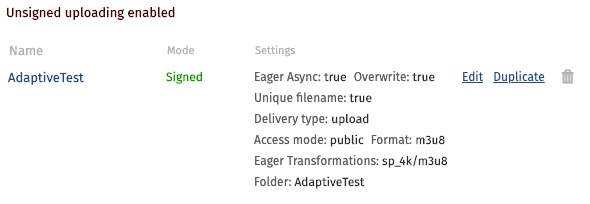
When uploading a video with this selected preset I would assume that the eager transformation would occur naturally, this does not happen, instead I get an error "video is too large.... turn on Eager Async" although as seen in the image above, I did turn this feature on. The video that I am uploading is just 120MB it should not be too big for anything.
What's missing here ?
-

Hi,
Looking at your approach, this is definitely the way to go in terms of using an upload preset to eagerly generate the required streaming profiles.
The error can be a bit misleading, which is what is happening here. Essentially, the error is returned when a task, either incoming or eager is requested synchronously. In this case, you are correctly creating the eager transformations and have also set Eager Async => true. However, the format => m3u8 that you've set is an incoming transformation telling Cloudinary to transcode the original video file (e.g. Mp4) to m3u8 during the upload and because it is not set to process asynchronously, via the Async flag, it hits the limit of maximum video file size that can be manipulated on-the-fly/synchronously which is 40MB for Free plans and 100MB for all paid. Videos larger than this can be manipulated/transformed but that would need to be done asynchronously.
In your case, you won't need the format field set to m3u8 and you can remove that. The original file will be uploaded and stored and the streaming profile derived would be created based on the eager transformations.
May I please ask you to remove the format => m3u8 configuration and retry the upload?
Best regards,
Aleksandar
0 -
Great, thanks a lot. That seemed to make a difference. I have now succesfully uploaded the video, under "derived videos" I now see a list of different videos in different resolutions. Looks like this:

Now that I got your attention, how do I get the src (link) that is "adaptive"? I'm using a react-player that creates a html5 video player, they should support adaptive streaming according to their documentation. But I can't really see which src link i should provide in the video player.
Once again, thanks a lot for the help so far.
Best regards, Rasmus0 -
Hi Rasmus,
Glad to hear that the eager generation has worked after removing the synchronous incoming transformation.
Regarding your question - The link you're looking for is to the master playlist which contains the reference to the index files for each representation. Each of those, in turn, has the relevant fragmented streaming files for that particular representation.
In your case, you would be looking for the following link:
This is the link that will be returned if you right-click on 'view video' and copy the link of the below derived which corresponds to the master playlist.

Best regards,
Aleksandar
0 -
Okay thanks! I thought so, only it downloads the file whenever i click the "view video" link, also it is http, but the player requires https. But thanks I got it working now I believe :)
Is it correctly understood that (if the browser supports HLS) it will determine which stream to use based on that master playlist file? There is no overhead that I need to do in terms of detecting bandwidth or cpu, that should be automatic right ?0 -
The only requirement is a player that can play HLS. If a player supports it then it would handle the change of representations it requests under the hood and there is nothing you'd need to implement yourself. A lot of players support it out of the box. On the other hand, Chrome, for example, cannot play it automatically if you open that URL directly in the browser and you would need an extension. In my example at the bottom, I use the Play HLS m3u8 extension and then I can play it by pasting the URL in the browser.
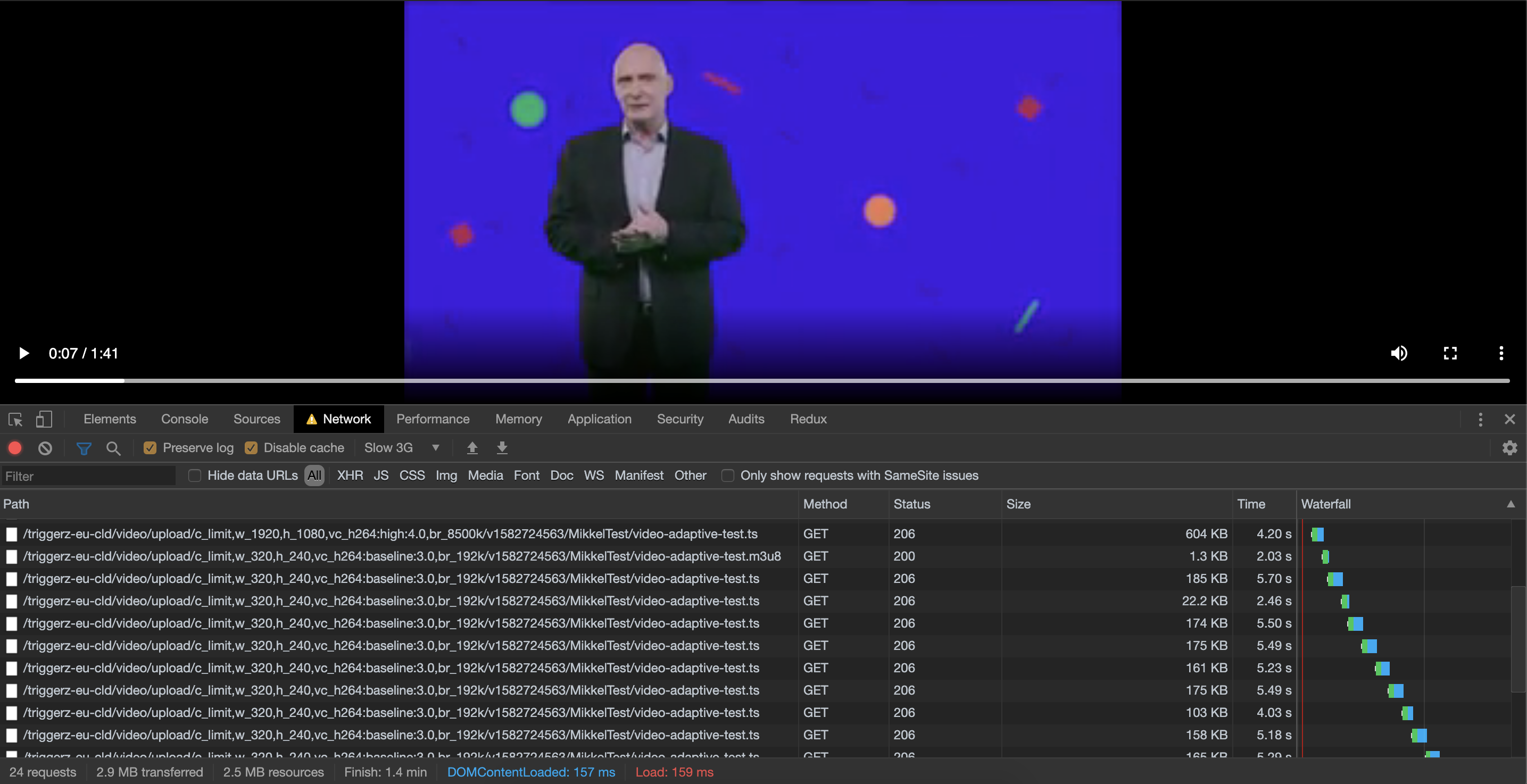
You can test it out in the video player you're using if you open the Network tab within the browser developer tools and throttle the connection by choosing Slow 3G for example. If you've started playing before throttling then once the current fragment is due to finish a request would be sent to grab a new index file for a lower representation and then there will be another request for the fragment (TS) file for that lower quality representation.
Below is an example. Notice the last 1920x1080 HD fragment then I throttled the connectivity to simulate Slow 3G and a request is sent for the index file of the 320x240 representation. Once that was downloaded the corresponding TS files start being requested too.
 0
0
Post is closed for comments.
Comments
5 comments