React - can't run example

I'm try first run Cloudinary react component.
First run ok (I'm change user_cloud to my cloaud) this code:
<CloudinaryContext cloudName="user_cloud">
  <Image publicId="v1604681035/sample.jpg" width="300" />
  <Image publicId="v1605812336/beclh7axcufkmovhjlvl.jpg" width="300" />
</CloudinaryContext>
Next I'm try to repeat first example from documentation:
https://cloudinary.com/documentation/react_integration
but when i add overlay the image stops showing
<Image publicId="v1604681035/sample.jpg" width="300">
  <Transformation
    overlay="v1605812336/beclh7axcufkmovhjlvl.jpg"
    width="50"
  />
</Image>
I'm put to overlay id from working example.
What's wrong in Transformation overlay ?
-

Hi,
Thanks for reaching out.
When applying an overlay, you do not need the version number nor the extension.
So it should be:
<Image publicId="v1604681035/sample.jpg" width="300">
  <Transformation
    overlay="beclh7axcufkmovhjlvl"
    width="50"
  />
</Image>

Please check out https://cloudinary.com/documentation/image_transformations#image_and_text_overlays for more details.

Best,
Mo
1 -
Thank you very march!
It;s work!
P.S. Get public id is impossible from Cloudinary Managment Console /Media library
For example I'm install and run React sample photo album.
And samle images upload to my cloud , for example:
https://res.cloudinary.com/dljazkzna/image/facebook/v1605737520/billclinton.jpg
I can use it overlay using colon exept / :
<Transformation
  overlay="facebook:v1605737520:billclinton"
  width="200"
/>
But will be more simple if public id will be shown in Media library
I'm find - that public id can be retrived using search_api:
https://cloudinary.com/documentation/search_api
But may be exist inner function like getPublicId("https://res.cloudinary.com/dljazkzna/image/facebook/v1605737520/billclinton.jpg") ?0 -

Hi,
The public ID is essentially the asset's path in Cloudinary, which means the asset's folder path concatenated with the asset's file name. It can be either retrieved by looking at the asset's URL (e.g. - "billclinton" is the public ID of the URL you shared earlier), or, be seen in the media library, by double-clicking an asset -
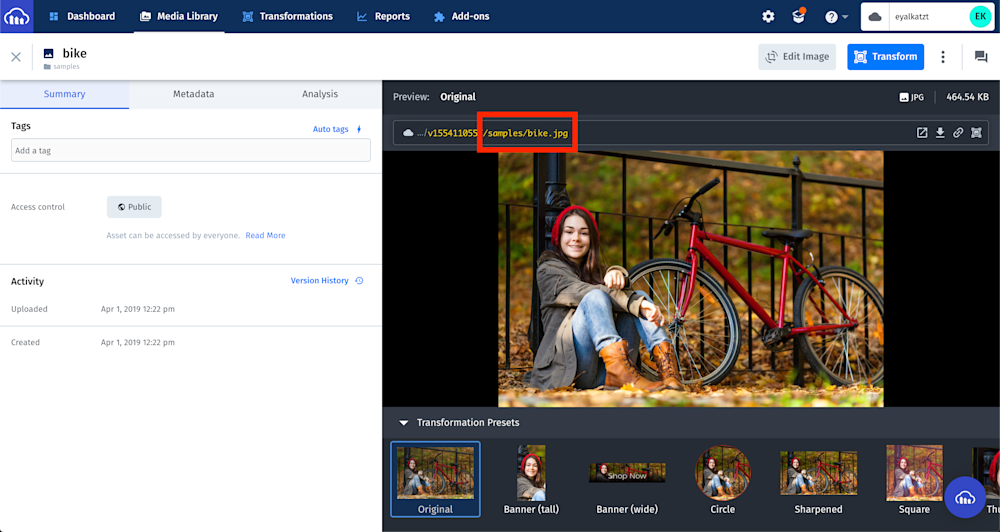
Note, that each asset in Cloudinary can be uniquely identified by these attributes - it's public ID, asset type, and delivery type. For instance - the asset which URL you've shared is uniquely identified by "billclinton" as public ID, "image" as asset type, and "facebook" as delivery type. This means that there can't be additional assets in your account that have the same three attributes.
1

Post is closed for comments.
Comments
3 comments