JS Media Library Widget: Don't see select bar

Hi,
Trying to configure this widget: https://cloudinary.com/documentation/media_library_widget#5_instantiate_and_open_the_media_library_widget
I was able to run it but when it's opened I don't see selected bar

My Code:
window.cloudinary.openMediaLibrary({
      cloud_name: 'cloud_name',
      api_key: window.cloudinary_api_key,
      signature: window.cloudinary_signature,
       timestamp: window.cloudinary_timestamp,
       username: 'example@test.com',
       multiple: false,
      inline_container: this.$refs.mediaLibrary,
       folder: {folder: {path: "d8f3b36fbc1d42c770f61055e8207caf"}},
   }, {
      insertHandler: function (data) {
         data.assets.forEach(asset => {
            console.log("Inserted asset:",
               JSON.stringify(asset, null, 2))
         })
      }
   }
)
also not sure how to configure default folder I was trying to do folder: {folder: {path: "d8f3b36fbc1d42c770f61055e8207caf"}}, but didn't work for me. what path property should be?
-

Hi Rob,
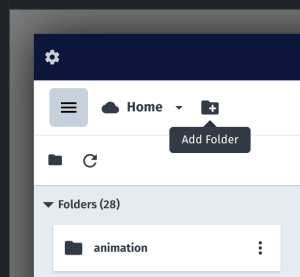
The Media Library Widget will be loading directly from your default folder as you have specified, but you may need to create the folder first through the Media Library Console. To add the folder, you can click on the + button as shown below and you could name it as 'd8f3b36fbc1d42c770f61055e8207caf':
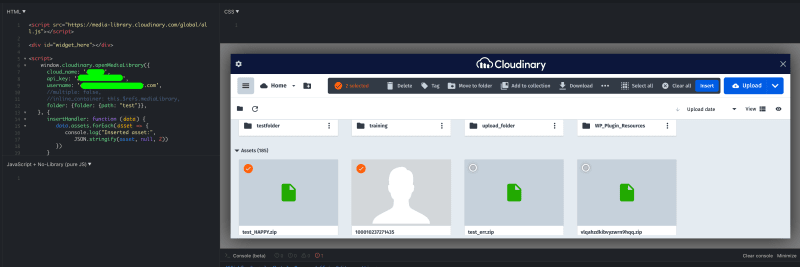
And for the menu bar to appear, you will have to select at least 1 image first so that the menu bar will be displayed and you could use the menu items (see the image check icon on the upper left corner):
Hope this helps, please let me know if you have any further questions.
0
Post is closed for comments.
Comments
1 comment